> ## Documentation Index
> Fetch the complete documentation index at: https://docs.soundcloud-desktop.fun/llms.txt
> Use this file to discover all available pages before exploring further.
# Theme, wallpaper and custom CSS
> Theme, wallpaper, font, scale and custom CSS. There is no light theme
It is all here: **Settings -> Appearance**.
| What to change | Where |
| - | - |
| Theme: **SoundCloud**, **Тьма** (black), **Неон** (purple), **Лес** (green), **Кармин** (red) or **Custom** (your own **Accent color**) | **Theme** |
| Wallpaper: **File**, **URL**, **Online**, a timer with **Slideshow** | **Background image** |
| Font | **Interface font** |
| Size of the whole window | **Interface scale** or **Ctrl+plus** and **Ctrl+minus** (**Cmd** on macOS) |
| Colors from the cover of the playing track | **Colours from the cover** |
| Order and visibility of blocks | **Layout** |
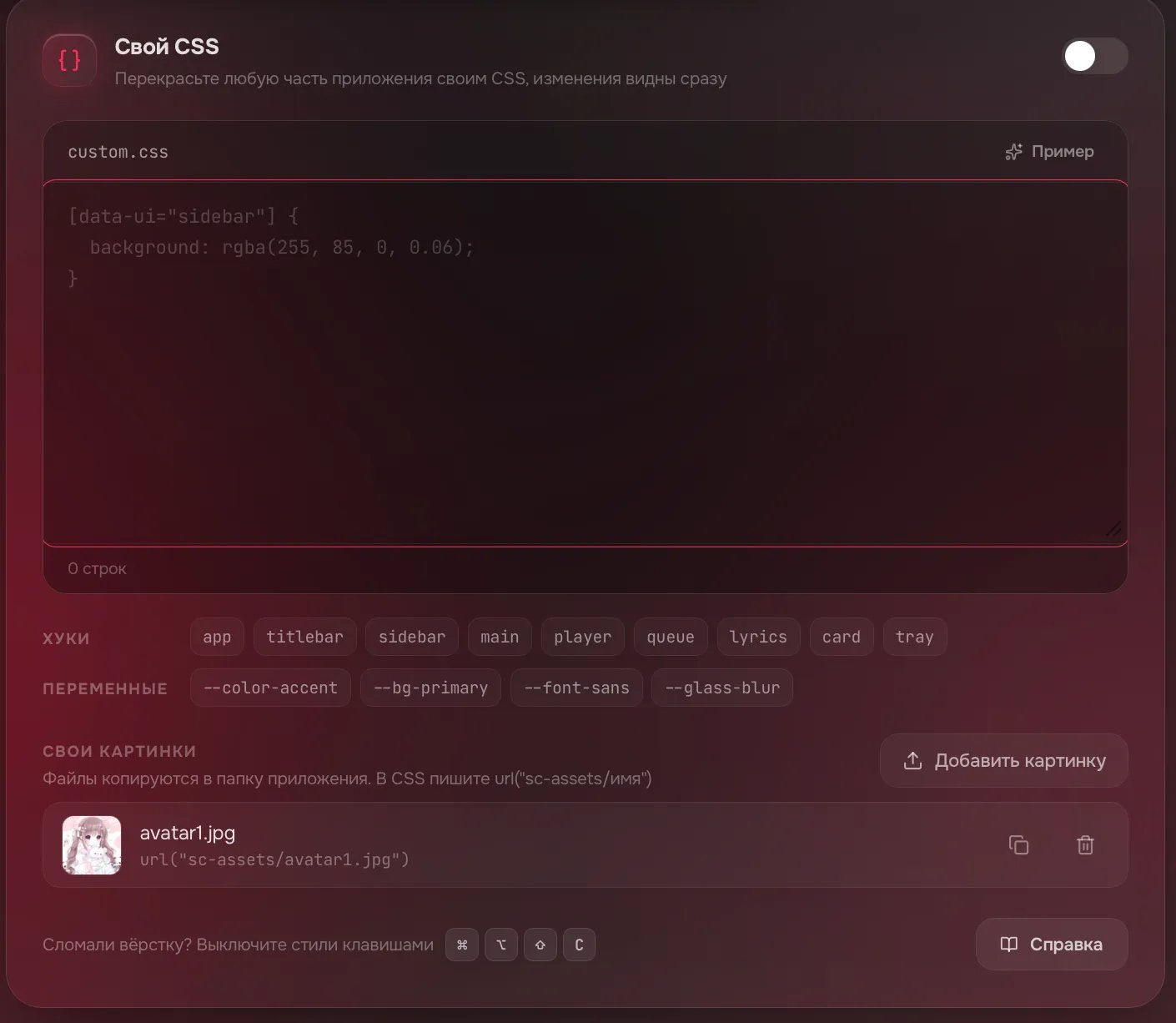
| Your own styles, how-to under the **Guide** button | **Custom CSS** |
There is no light theme: all themes are dark.
## Set a wallpaper
**Settings -> Appearance -> Background image**.
Click **File** and choose a picture. Other ways: **URL** (paste a link and click **Download**) or **Online** (search for wallpapers).
**Background darkening**, **Edge darkening** and **Background blur** appear under the pictures. **None** removes the background.
Broke the look with your CSS? Press **Ctrl+Alt+Shift+C** (**Cmd+Option+Shift+C** on macOS): the styles turn off. Press it again to turn them back on.
The link does not work with every site. Download the picture to your computer, click **File** and choose it.
A big GIF (tens of megabytes) may fail too: use an animated WebP or a smaller file.
1. Open **Custom CSS -> Your images** and click **Add image**. PNG, JPG, WebP, GIF, SVG and AVIF up to 10 MB work.
2. Click the copy icon next to the file (tooltip **Copy CSS**). `url("sc-assets/name")` goes to the clipboard.
3. Paste it into your CSS:
```css theme={null}
[data-ui="sidebar"] {
background-image: url("sc-assets/bg.webp") !important;
background-size: cover;
}
```
Links to websites and paths like `C:\` do not load in CSS.
 Post a screenshot and your CSS in the **темы** forum on [Discord](https://discord.gg/xQcGBP8fGG).
Click **Reset to defaults** at the top right of the first card (**Appearance**). The theme, wallpaper, font and cover colors are reset. Scale, layout and custom CSS stay.
Quit the app completely ([how to quit](/en/fix/wont-close)) and start it without your CSS:
Right-click the shortcut -> **Properties**. At the end of the **Target** field type a space and `--no-custom-css`. Click **OK** and start the shortcut.
```bash theme={null}
open -a soundcloud-desktop --args --no-custom-css
```
```bash theme={null}
soundcloud-desktop --no-custom-css
```
Custom CSS stays off. Fix it or click **Clear**, then turn the **Custom CSS** switch back on. On Windows remove the flag from the shortcut.
## Related topics
- [Is there a feature, and where](/en/use/features.md)
- [Forks and builds from strangers](/en/about/forks.md)
- [Black screen or "Something went wrong"](/en/fix/black-screen.md)
- [Linux: white or blank window](/en/fix/linux-window.md)
- [MSVCP140.dll or another .dll was not found](/en/fix/windows-dll.md)
This documentation is built and hosted on [Mintlify](https://mintlify.com), a developer documentation platform.
Post a screenshot and your CSS in the **темы** forum on [Discord](https://discord.gg/xQcGBP8fGG).
Click **Reset to defaults** at the top right of the first card (**Appearance**). The theme, wallpaper, font and cover colors are reset. Scale, layout and custom CSS stay.
Quit the app completely ([how to quit](/en/fix/wont-close)) and start it without your CSS:
Right-click the shortcut -> **Properties**. At the end of the **Target** field type a space and `--no-custom-css`. Click **OK** and start the shortcut.
```bash theme={null}
open -a soundcloud-desktop --args --no-custom-css
```
```bash theme={null}
soundcloud-desktop --no-custom-css
```
Custom CSS stays off. Fix it or click **Clear**, then turn the **Custom CSS** switch back on. On Windows remove the flag from the shortcut.
## Related topics
- [Is there a feature, and where](/en/use/features.md)
- [Forks and builds from strangers](/en/about/forks.md)
- [Black screen or "Something went wrong"](/en/fix/black-screen.md)
- [Linux: white or blank window](/en/fix/linux-window.md)
- [MSVCP140.dll or another .dll was not found](/en/fix/windows-dll.md)
This documentation is built and hosted on [Mintlify](https://mintlify.com), a developer documentation platform.